Salesforce
backup and recovery

Find affected records. See their relationships. Recover data with search, record previews, and dependency-aware recovery.
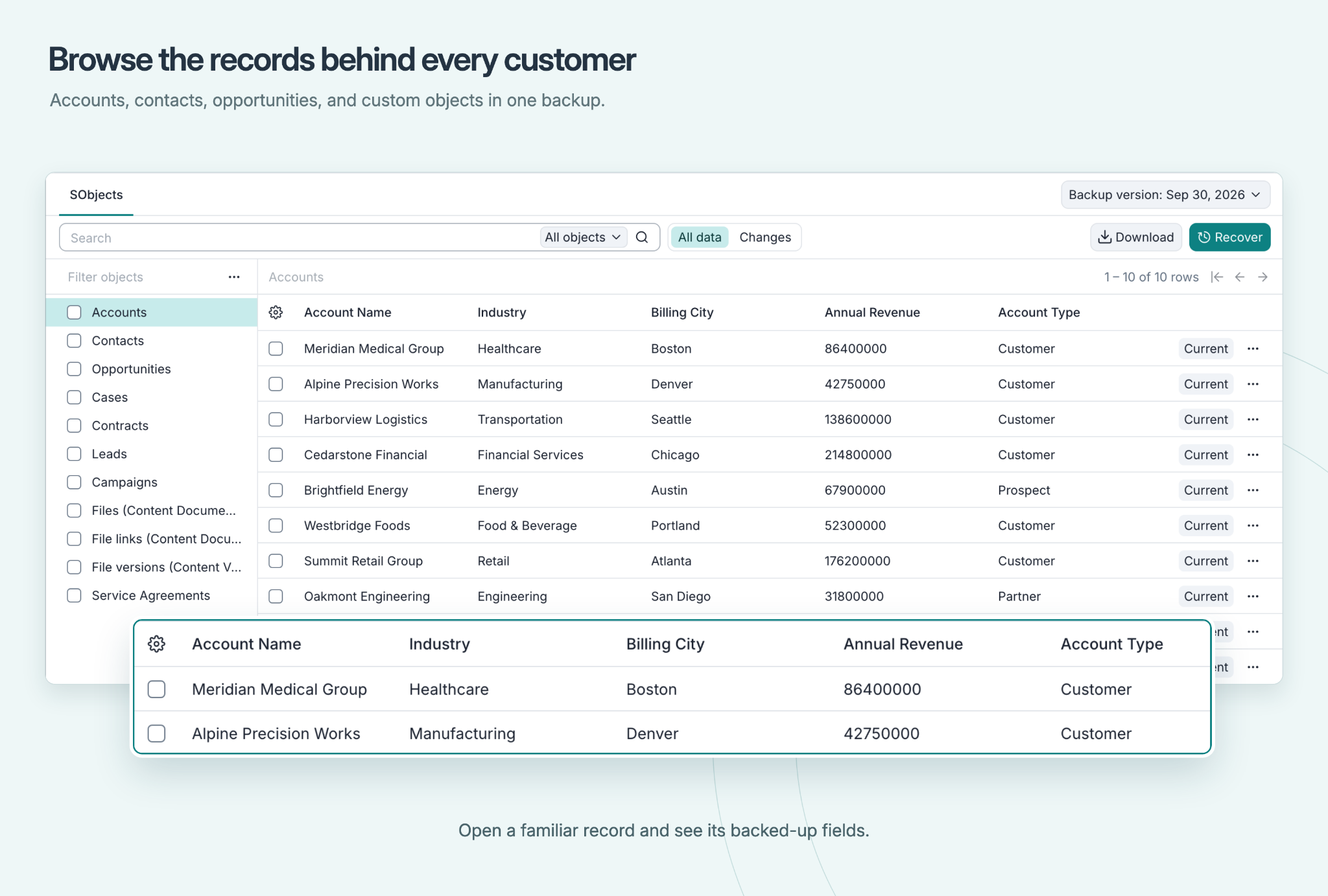
Afi Salesforce backup browser showing Accounts, object selection, backup version and recovery action.
Request demo / quote
Start free trialFree trial; takes 1 min to start
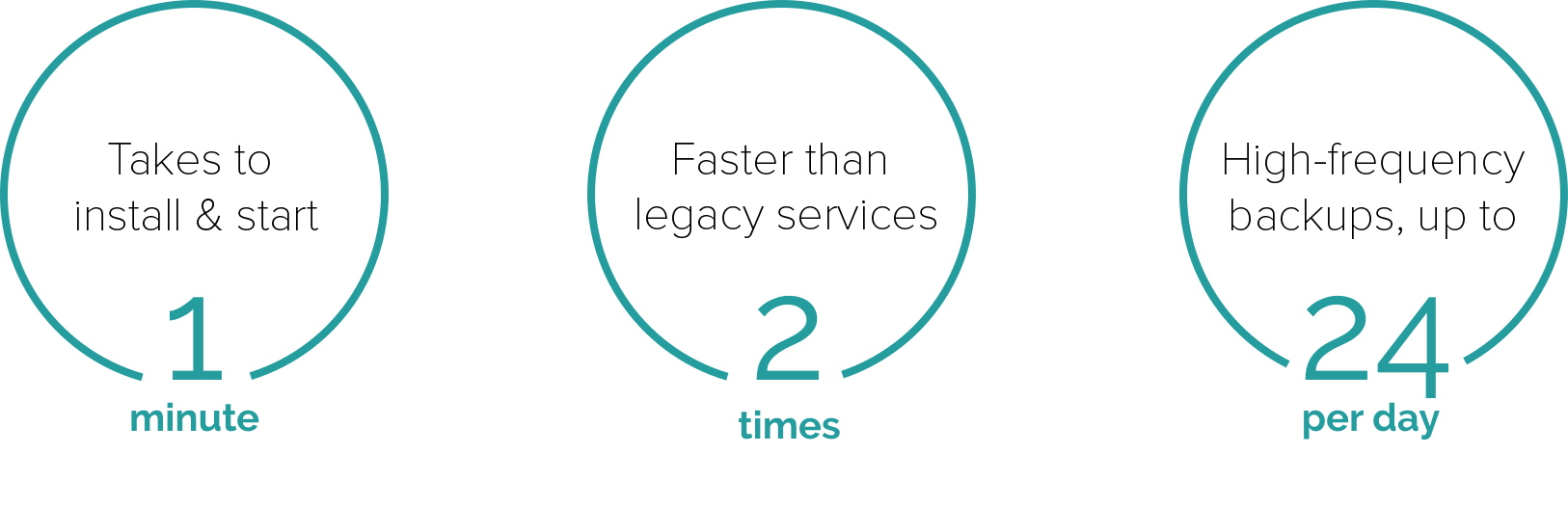
Takes one minute to install and start; two times faster than legacy services; high-frequency backups up to 24 per day.

Protect your CRM data

Back up the records behind every customer

Your customer history spans more than one object. Afi brings backed-up records and related content together so you can understand what you are protecting and what you need to recover.
  • Protect standard and custom object records, including Accounts, Contacts, Opportunities and Cases.
  • Browse related files, attachments and notes alongside the records they belong to.
  • Inspect parents and children before choosing a recovery scope. Coverage depends on the integration user’s access.
  • Treat configuration separately: choose whether to restore only a single object's metadata or recover the data with all dependencies.
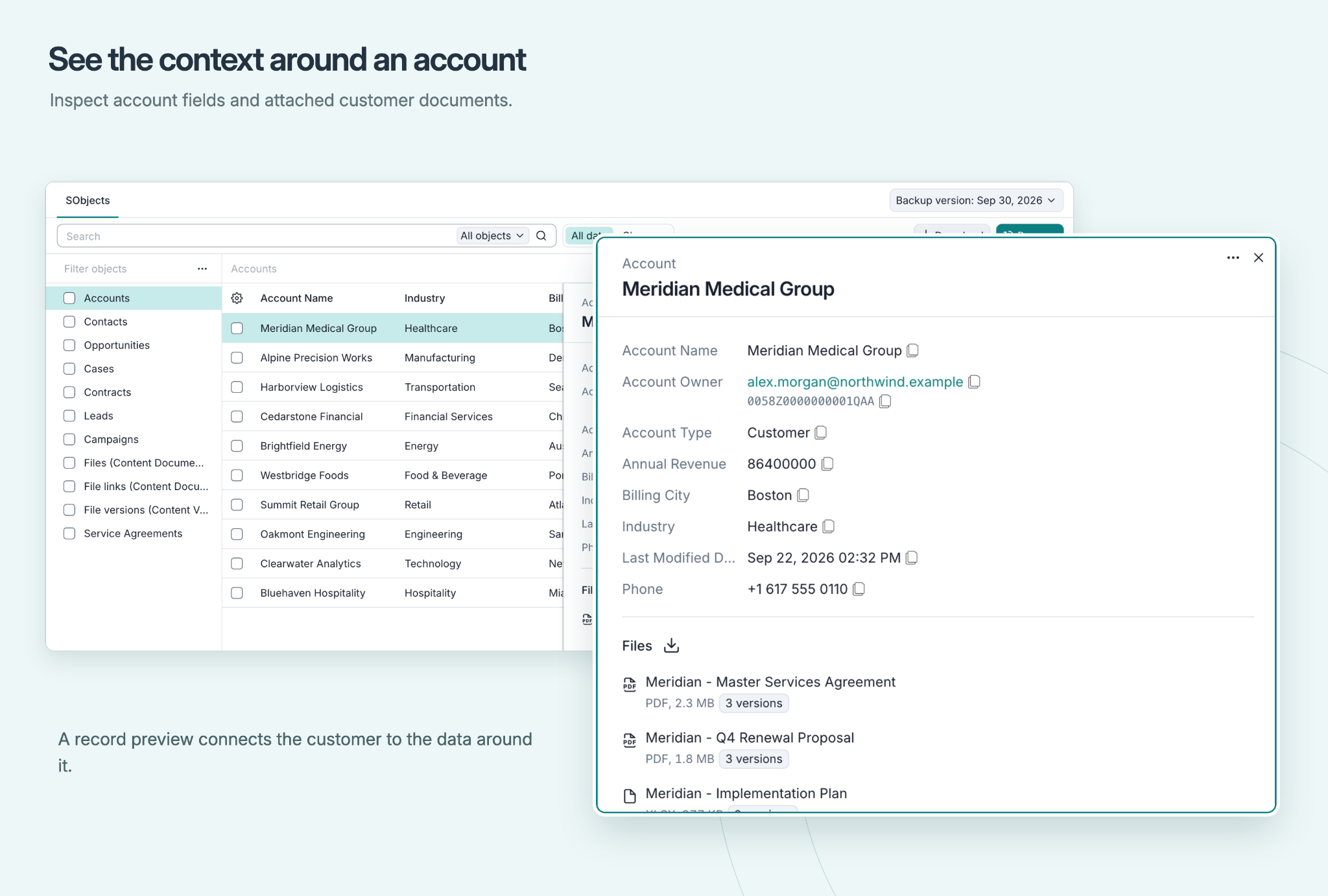
Account preview showing backed-up fields and related customer documents.

Recover from unwanted changes

Find the change. Choose what to recover.

An integration overwrites Account information. Start with a backup from before the incident, use Changes to find modified records, then search and preview the affected Accounts.
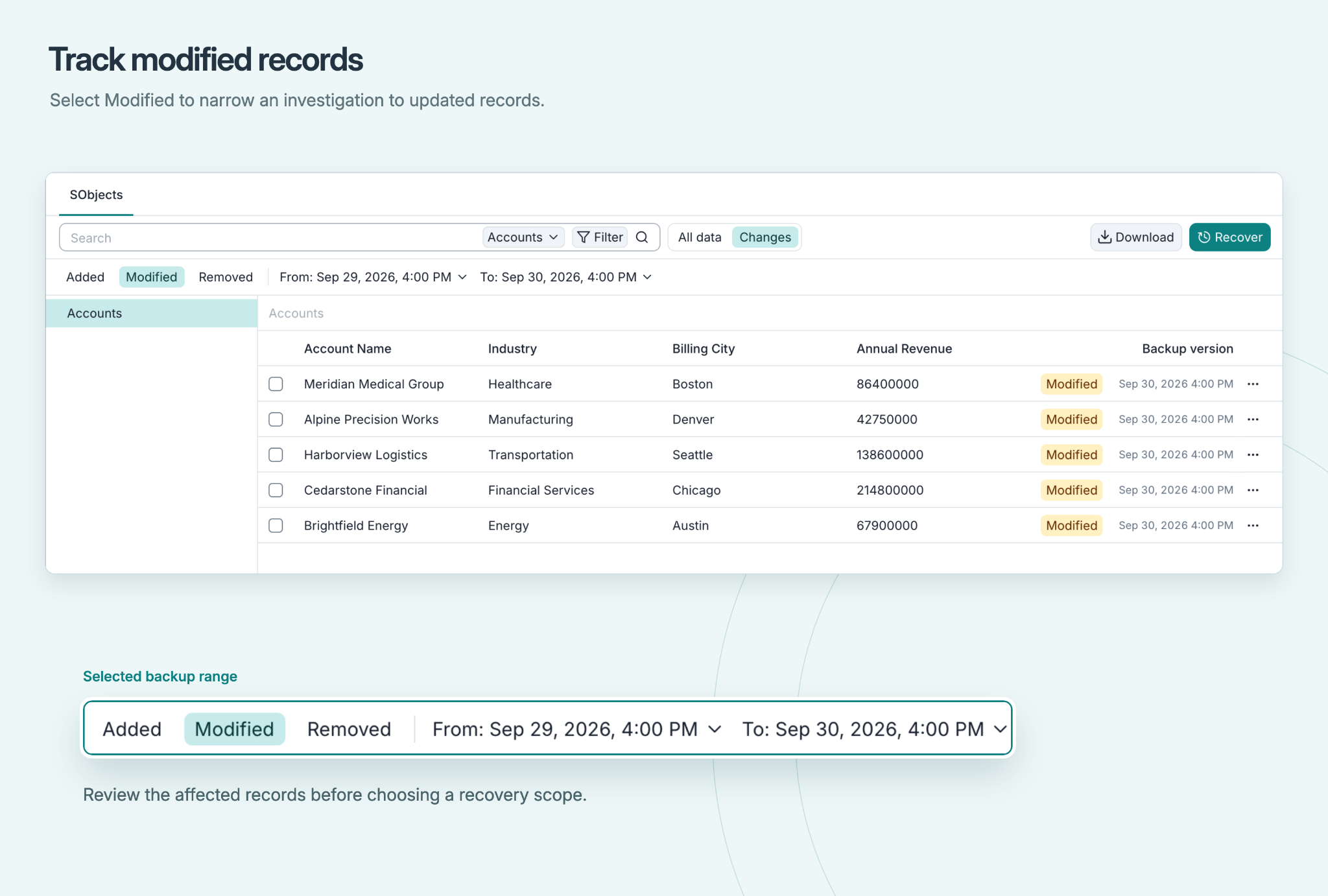
  • Filter records added, modified or removed across a backup range.
  • Select records and the related child data to recover. Afi orders supported dependencies and remaps references when recreated records receive new IDs.
  • Review valid later updates before restoring: record-level recovery can replace later field values. Check the recovered records and relationships in Salesforce.

Find Changes

Afi Changes view with Modified selected and a backup date range above the affected Account records.

Narrow the search

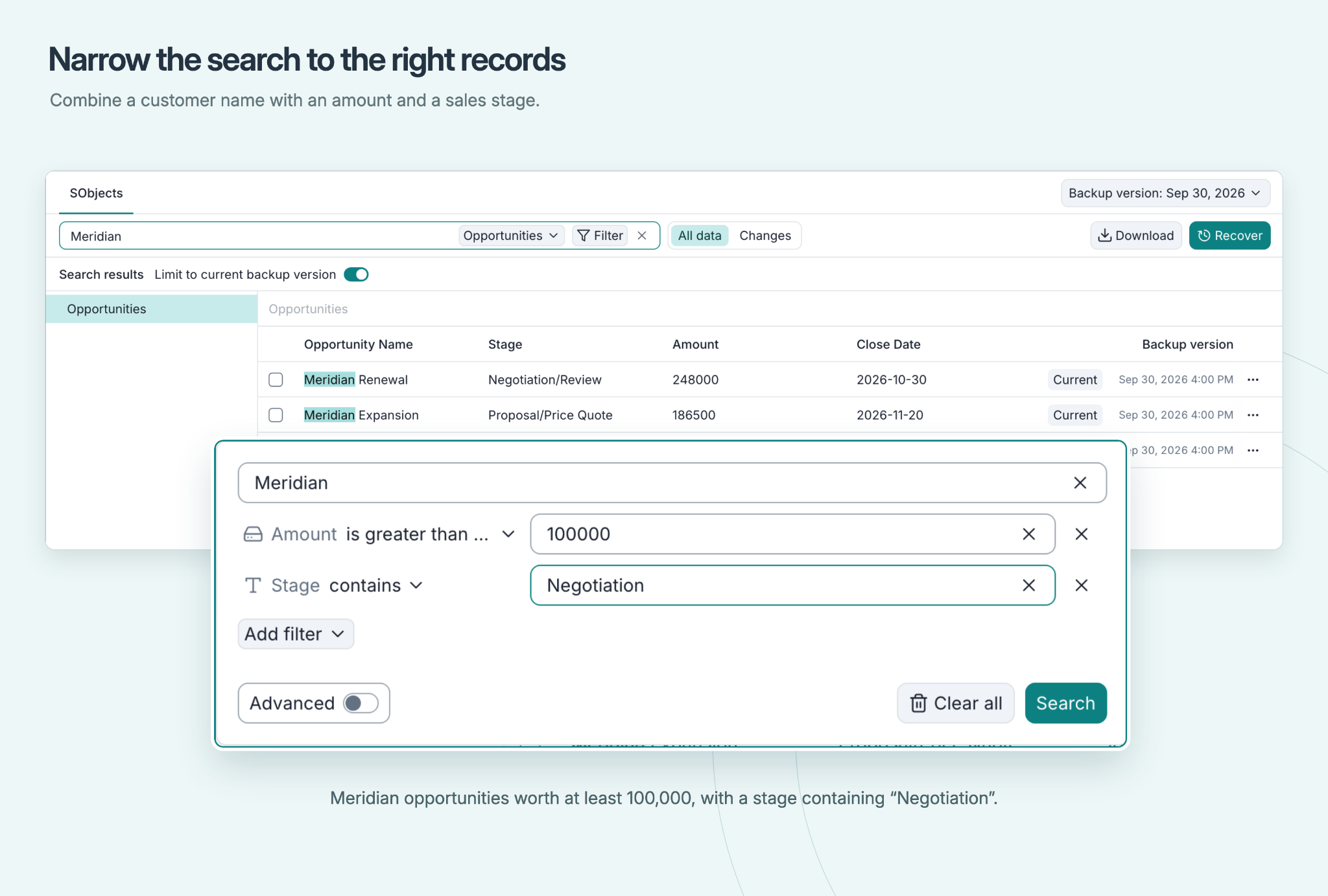
Salesforce search with a customer name, an amount filter and a sales-stage filter.

Inspect before recovery

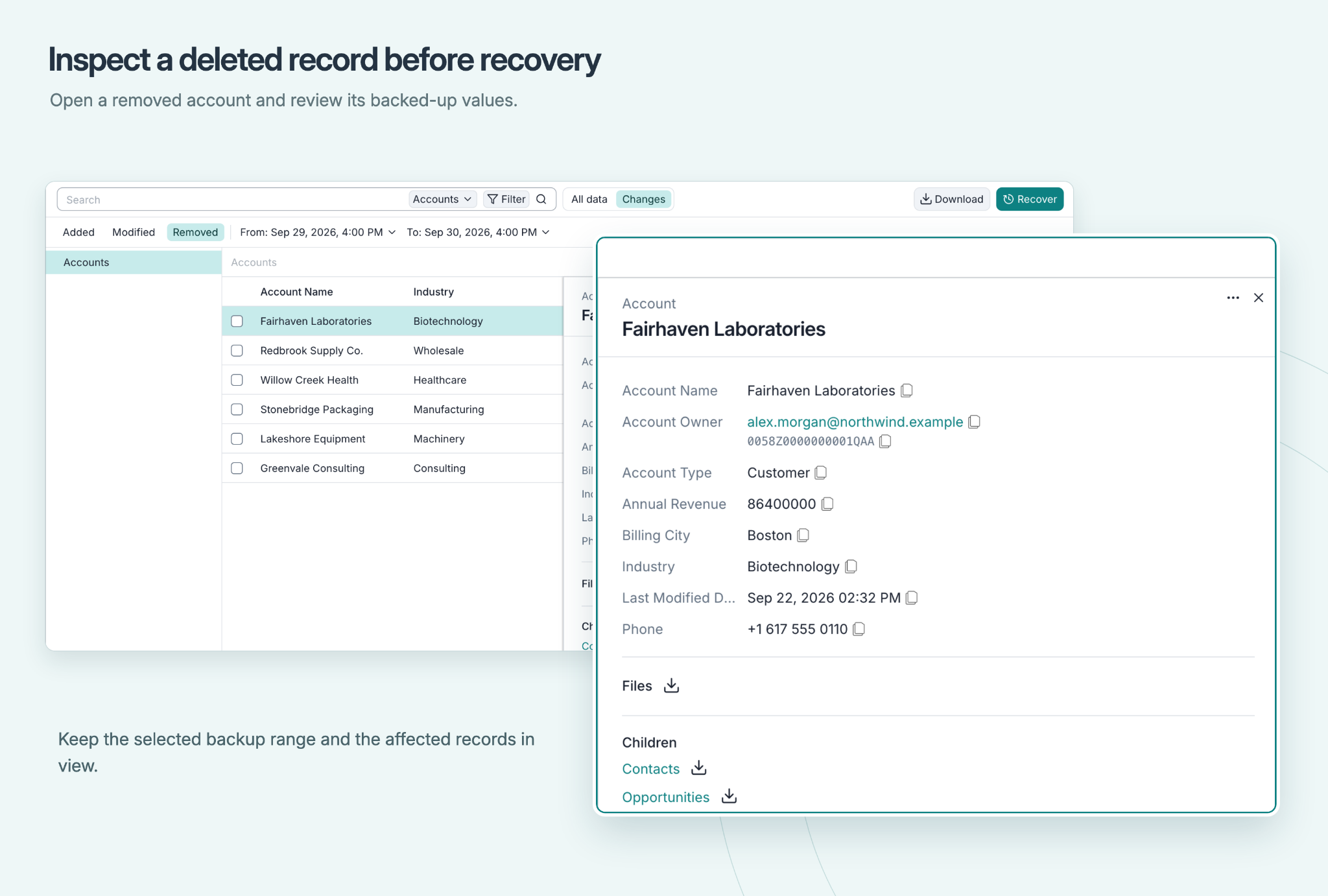
Removed Accounts and a deleted Account preview showing backed-up values, files and child record links.

Manage routine protection

Keep protection in view

Give administrators a clear starting point for setup and day-to-day review. Permission checks and backup health reporting help your team see where attention is needed.
  • Review permissions required for backup, restore and optional capabilities during onboarding.
  • Correct missing access in Salesforce, switch the integration user if needed, and check again.
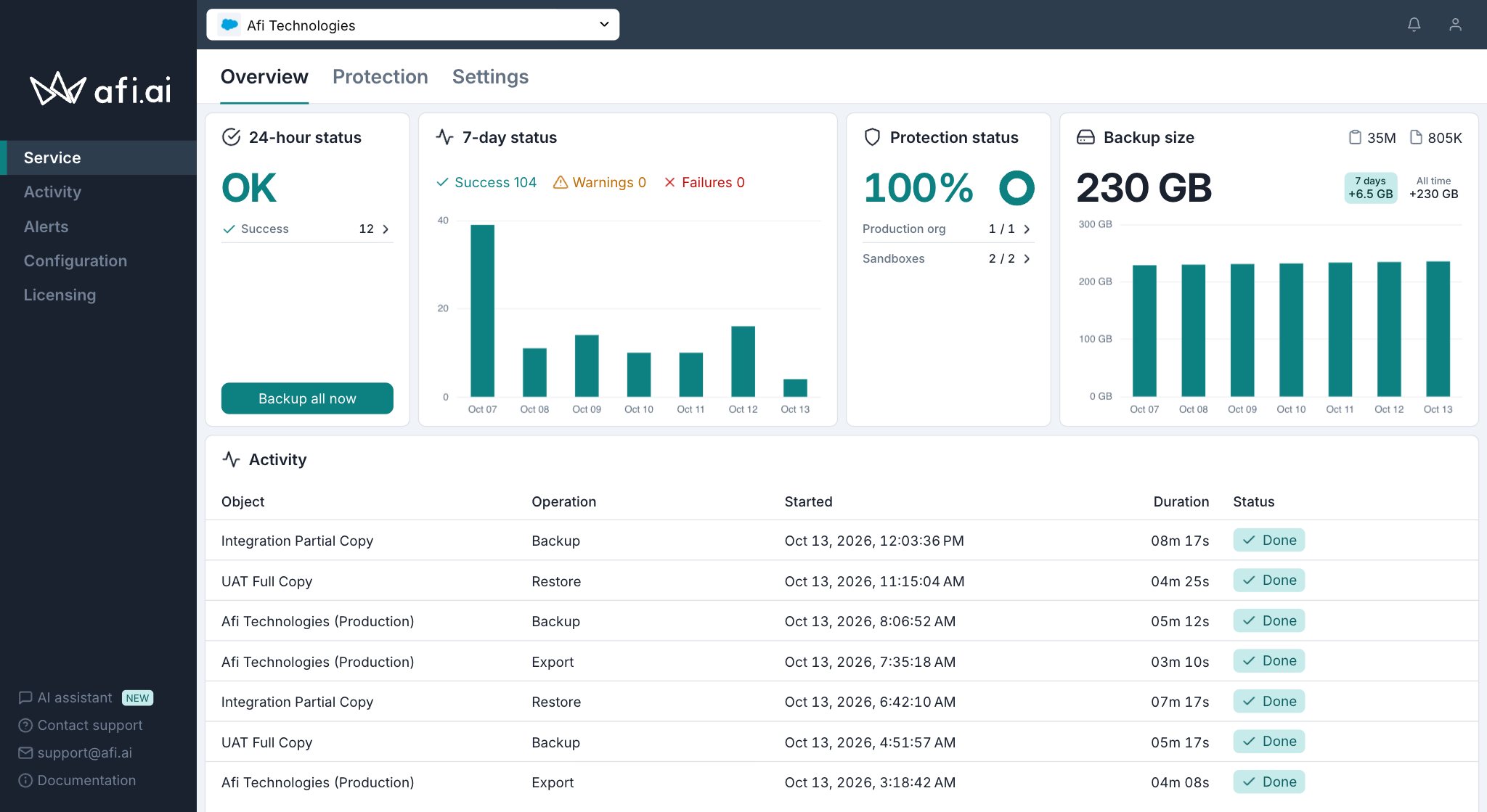
  • Track backup health with status reports and notifications. Review exceptions as part of your protection routine.
Afi Salesforce dashboard showing backup health, seven-day status, protection coverage, backup size and activity.

Protect access to backups

Put safeguards around your recovery data

Protect backup administration as carefully as the data itself. Afi’s platform combines encryption with controls over keys, access settings and sensitive changes.

  • Encrypt backup data in transit and at rest; use customer-managed keys through AWS KMS, Azure Key Vault or Google Cloud KMS.
  • Enable lockdown mode to require a separate secret for sensitive changes, including access, retention and backup deletion.
  • Data deletion protection with delayed deletion, administrator alerts, and the option to cancel scheduled deletions, supported by extensive logging and anomaly detection.
Encrypted backup dataIn transit and at rest
Your key-provider choiceAWS KMS · Azure Key Vault · Google Cloud KMS
Lockdown modeSeparate secret for sensitive operations

Support change and development

Work with recovered data outside production

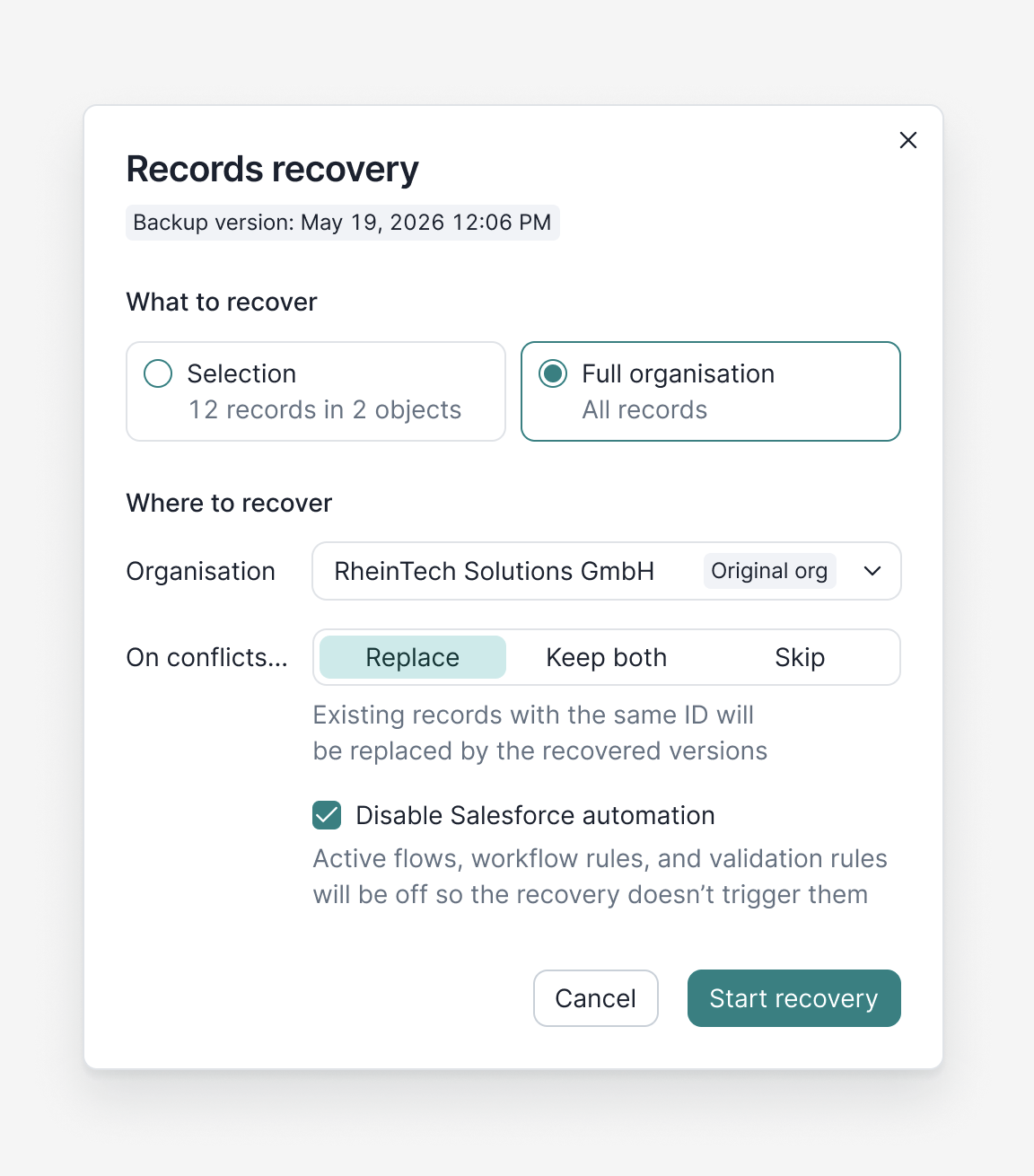
Reproduce an integration problem or inspect a connected dataset in a sandbox. Afi lets you choose an onboarded sandbox as a recovery destination.
  • Select the records and child hierarchy your investigation needs.
  • Use dependency handling and reference remapping in the destination org.
  • Optionally pause supported flows, workflow rules and validation rules during recovery, then restore their prior settings.
Salesforce records recovery dialog showing recovery scope, destination organisation, conflict options and the Salesforce automation setting.

Delegate and review activity

Give each team the access it needs

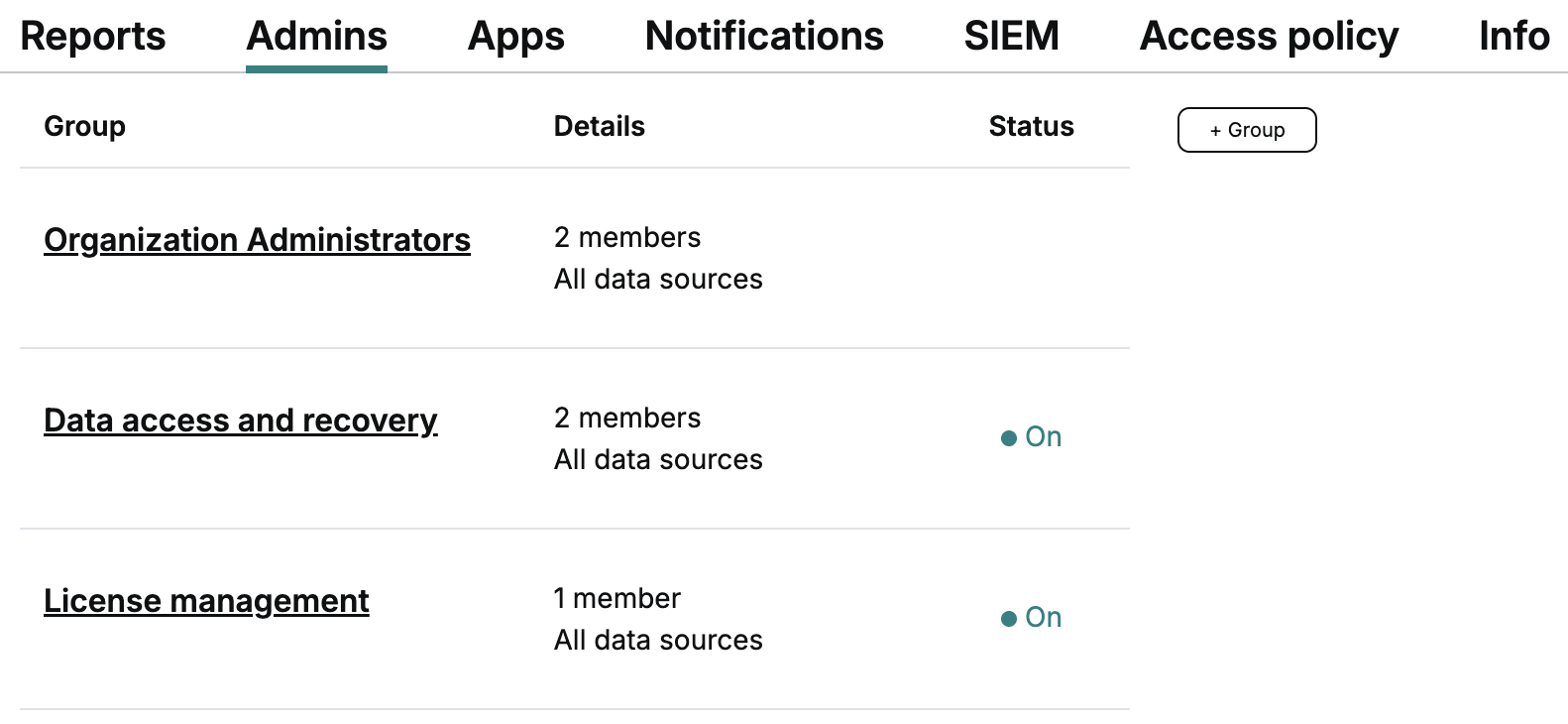
Separate recovery work from account administration. Afi’s access model lets you assign backup management, browsing, restore and export permissions independently.
  • Let an operations colleague review protection status without granting access to backup content.
  • Assign recovery permissions deliberately and use SSO with identity-provider MFA to control sign-in.
  • Review data access and administrative events, or forward them to Splunk, Datadog, Microsoft Sentinel, Sumo Logic or a webhook.
Afi access management showing organization administrators, data access and recovery, and license management groups.

Talk through your requirements

Plan your Salesforce backup with Afi

Bring your recovery scenarios and environment requirements. Ask for a demonstration using your object relationships, and a quote that spells out the scope you need.

  • Production orgs and sandbox destinations
  • Data volume, retention and storage location
  • Licensing, support and commercial terms

Get a recovery plan.
Talk to us.

Salesforce data backup, with context

Record search

Find records by names, IDs and field values across backup versions.

Record previews

Inspect fields, parents, children and related files before recovery.

Changes view

Narrow an investigation to added, modified or removed records.

Connected recovery

Order supported dependencies and remap recreated record references.

Contextual export

Export Account CSVs and related content in folders by Account ID.

Sandbox destinations

Recover a selected dataset into an onboarded sandbox.

Retention choices

Keep history indefinitely or set version and GFS retention policies.

Activity audit

Review backup data access and administrative actions.

Key control

Choose customer-managed keys from three cloud KMS providers.

See how it works

Browse your backups
Review changes
Record recovery

Security and Compliance

Afi partners with Google Cloud Platform (GCP) and Amazon Web Services (AWS) that host all Afi application components and all customer data. GCP and AWS are compliant with the strictest security standards and regulations, including SOC and ISO 27001.

Afi is compliant with SOC 2 Type II and other major security standards and regulations. We follow the Secure Software Development Life Cycle (SSDLC) process and are a member of industry organizations, including the Cloud Security Alliance.


Cloud Security AllianceGDPRSOCData Privacy FrameworkAPPsFERPAPIPEDACCPANHS information governance

Here Is What Our Customers Say

    G2
    Verified User in Construction
    Mid-Market (51-1000 emp)
    "Reliable [,] works consistently"
    I really like how it integrates seamlessly with Azure, and it allows me to use the "Bring your own Encryption token." Users also have access to back up their data. I also like how it backs up SharePoint and Teams sites 3 times/per day. I needed to restore from backups in order to get some data that was deleted, and it worked. I also like how the M365 single sign-on just works. I didn't have to configure anything on my end.
    Gartner
    IT Tech Leader,
    Retail Industry (firm size: $500M-$1B)
    “An Impressive Backup Solution”
    Great product. We migrate from other product who tools days to backup and restore. Once we switched to AFI.ai the speed and ease of use is dramatically improved, even in single restore of file or folder. The key factors that drove the decision were: product functionality and performance, overall cost.
    Capterra
    David G,
    Security Services Manager, (501-1000 emp.)
    “A SaaS Backup for Cloud”
    Afi has been a great service so far. It is one of the few services that I would recommend without hesitation. It was easy to setup. It works reliably and is fast. It just stays out of your way and does what it's supposed to do without any complications or worries. I highly recommend Afi!

Learn more about Afi

Salesforce backup questions

Accidental deletions, faulty integrations, and malicious changes through malware or hacked accounts can put critical data at risk. A dedicated Salesforce backup solution helps you recover deleted or corrupted data and relationships, reduce downtime, and avoid costly manual recovery.

Standard and custom object records, related files and attachments, and metadata.

Choose a backup version, inspect Changes, and search or browse the affected records. Select the records and related data to restore. Recovery operates at record level, not selected-field rollback, so review any valid later updates before replacing values.

Afi resolves supported parent and child dependencies, orders recovery and remaps references when recreated records receive new IDs. The selected child hierarchy determines the related data to include. Validate your particular relationship types and the recovered result as part of your recovery plan.

Yes. Afi supports the original org or another connected destination, including an onboarded sandbox. Choose the destination and record scope, then check that its configuration, permissions and capacity fit the data you intend to restore.

Afi supports indefinite backup history, a configured version-retention period, or grandfather-father-son (GFS) retention for daily, weekly, monthly and yearly snapshots. Choose the history your recovery plan requires. Retention settings are separate from storage and commercial terms.

Afi permissions govern backup administration, browsing, recovery and export. Configure those responsibilities separately. Lockdown mode can restrict sensitive operations, including backup deletion, until an authorized administrator supplies the separate secret. Scheduled backup deletion can be cancelled before it runs.

Review the integration user’s required backup and restore permissions and the optional permissions shown by Afi. Correct missing access and recheck it. These are general integration checks: they do not provide a complete field-by-field coverage audit, and inaccessible records may be skipped.

Get your Salesforce data back

Walk through your recovery scenario with the Afi team.

Request demo / quote