Backup SLA policies
Afi SaaS backup for Amazon Web Services uses the concept of a backup SLA policy to protect virtual machines and databases as well as configure custom backup settings, such as frequency, retention and archiving settings, and encryption keys (Afi- or customer-managed).
A resource or a set of resources can be protected by an SLA policy directly on the Service → Protection screen, or an SLA policy can be assigned to a group of resources on the Service → Protection → Resource groups and the Service → Protection → Dynamic groups tabs, enabling automatic protection for resources added to the group.
Backup SLA policies are managed on Service → Settings → SLA. Afi creates predefined Gold, Silver, Bronze, and Manual policies during onboarding. Administrators can modify these policies or create additional policies for different business, recovery, and compliance requirements. The service cost is not influenced by the backup SLA policies used, so you are free to select or configure any policies that best suit your use cases.
Backup SLA policy management
Backup SLA policies for a tenant are configured and managed on the Service → Settings → SLA tab in the Afi portal.

You can view and modify the settings of an SLA policy by clicking its tile in the policy list, or create a new SLA policy by clicking the Add new SLA button in the top-right corner of the screen.
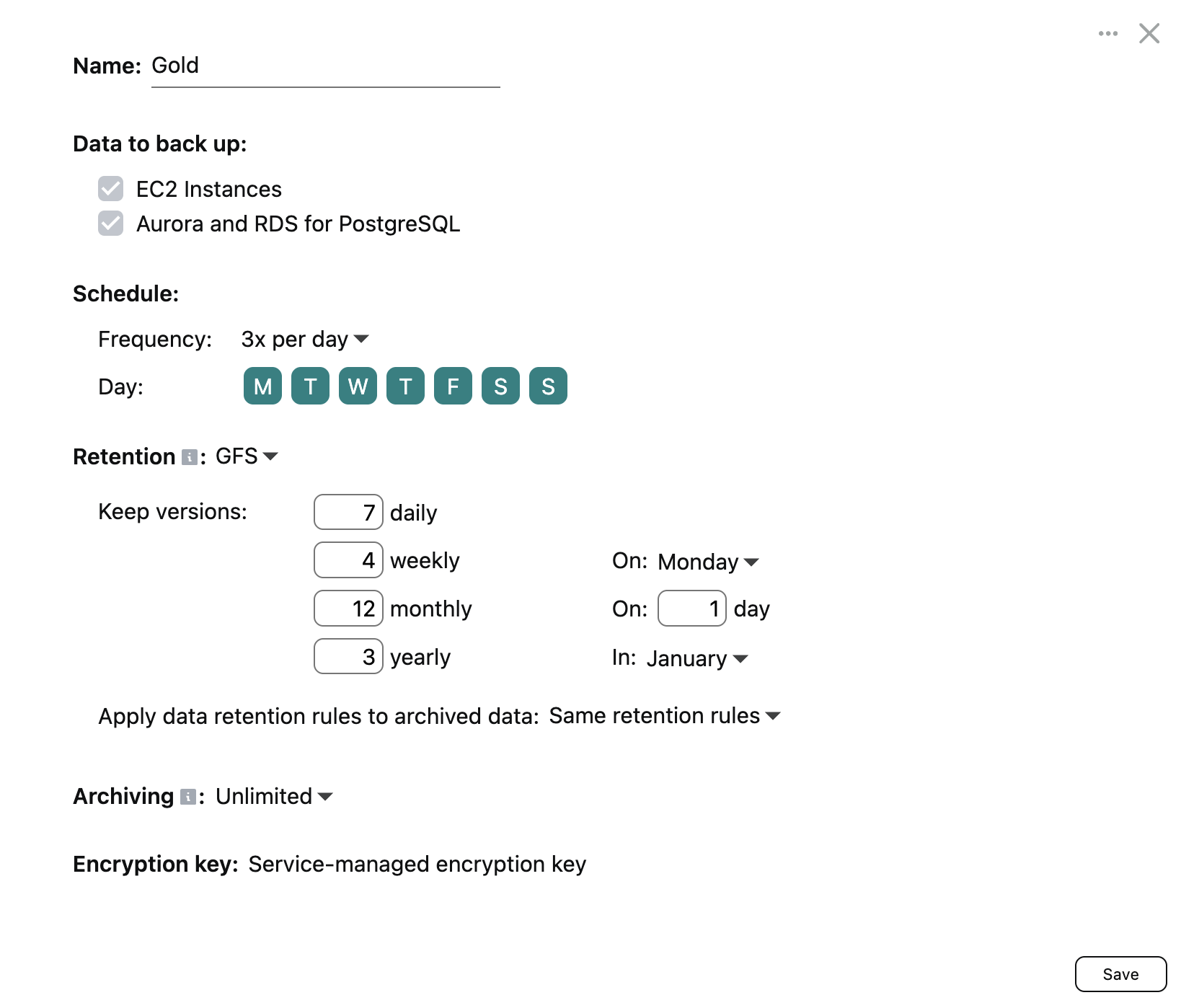
The available SLA policy settings are explained below.
Data to back up
This section lists which workloads are backed up by the Afi service for resources protected by an SLA policy. Currently, Afi provides protection for AWS EC2 instances, AWS PostgreSQL RDS/Aurora databases, and Amazon RDS for SQL Server.
Info
Support for other AWS workloads (EFS file storage, AWS cloud configuration, and other workloads) is coming in the next product updates.
Schedule
Schedule settings define how often Afi backs up resources protected by the policy. Choose automatic backups once or three times per day, or select Manual to start backups only on demand from the Afi portal. If the Manual frequency is selected, the Afi service will not initiate backups for the associated resources automatically. It is recommended to use the automatic backup options (once or three times per day) to ensure your data is backed up periodically and in a timely manner.
Automatic backups start within backup windows:
- Once per day: A single 9-hour window. Configure its start time with Starts at, in the time zone shown in the dialog.
- Three times per day: Three 6-hour windows distributed throughout the day.
Spreading backup start times across a backup window is essential to avoid peak loads on Amazon Web Services and to prevent API throttling.
Retention
By default, Afi retains all backup snapshots for each backed up resource indefinitely. However, you can configure custom backup version or GFS data retention rules for an SLA policy to specify how long backup snapshots are retained by the service. The available data retention rules are described in the following article.
Retention and archiving rules are enforced for resources protected by an SLA policy through periodic backup jobs. If a resource is no longer protected by a backup SLA policy, Afi keeps its existing backup history, but does not apply custom retention or archiving rules.
Archiving
Archiving rules define how long the Afi service will keep a backup for a resource protected by an SLA policy after it is marked as Archived on the Afi side. A resource becomes Archived when it is deleted on the AWS side. Archiving rules are described in detail in the following article.
Encryption
By default, all Afi backups are encrypted using per-tenant Afi-managed encryption keys. Additionally, Afi supports configuring customer-managed cloud KMS encryption keys that allow service administrators to meet regulatory requirements and gain an additional layer of control over their backup data. Customer-managed (BYOK) encryption setup is described in this article.
Protecting resources with a backup SLA policy
Once you have selected or configured a backup SLA policy that you plan to use, you can assign it to a resource or a set of resources on the Service → Protection tab. When a resource is protected with an SLA policy, you can trigger its backup by clicking the backup button.
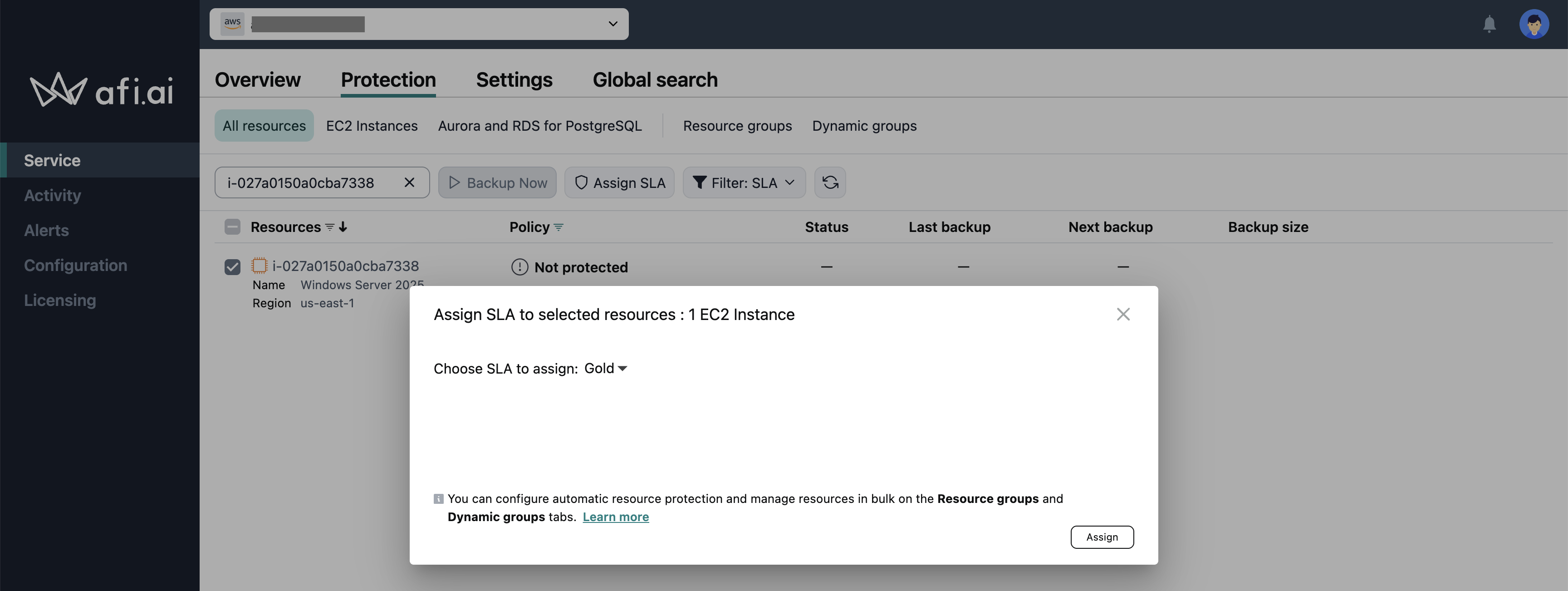
You can also assign a backup SLA policy to a group of resources that belong to a selected resource group on the Service → Protection → Resource groups (to protect all resources of a certain kind, for example, all EC2 instances, PostgreSQL databases, or SQL Server instances) and the Service → Protection → Dynamic groups (for more granular configuration based on tag values or regions) tabs. Please see the following guide for more details.
For AWS tenants, you can create multiple independent backup sequences for a resource (e.g., an EC2 instance, a PostgreSQL database, or a SQL Server instance) by protecting it multiple times using different backup SLA policies (e.g., Gold and Silver). This approach enables you to back up resource data to multiple backup storage locations in different regions (coming in H2 2026).
Please note that each backup sequence is linked to its corresponding backup SLA policy. If you assign a new backup SLA to a resource and initiate a backup, it will create a new backup sequence from scratch.