Data deletion requests
Data deletion requests allow administrators to permanently remove individual emails or files from an Afi backup without deleting the entire backup. This workflow is intended for targeted deletion scenarios, such as privacy or compliance requests that require specific backed-up files or emails to be removed from historical backup data.
As a sensitive data management operation, data deletion requests are not performed immediately and require approval from another administrator who can either approve or decline the request.
Info
To remove the entire backup for a resource, together with all its backup snapshot history, use the backup deletion feature instead.
If your goal is to reduce the backup storage usage for a tenant, we recommend configuring backup version or GFS retention rules.
Warning
After a data deletion request is completed, it cannot be undone and the deleted backup data cannot be previewed, exported, restored, or recovered from Afi. Review the selected items carefully before creating or approving a request.
Supported workloads
Data deletion requests are supported for backed-up files and email messages in the following workloads:
| Provider | Workload | Supported data |
|---|---|---|
| Google Workspace | Gmail | Email messages |
| Google Workspace | Google Drive | Files in user drives and Shared drives |
| Microsoft 365 | Exchange Mail | Email messages in the primary, In-Place (Online) Archive, and Recoverable Items mailboxes |
| Microsoft 365 | Group Mail | Group mailbox messages |
| Microsoft 365 | OneDrive | Files in a user's OneDrive |
| Microsoft 365 | SharePoint Online | Files in SharePoint document libraries |
Other workloads, such as chats, contacts, calendars, etc. as well as folder deletion, are not currently supported by data deletion requests.
How data deletion requests work
Submitting a data deletion request
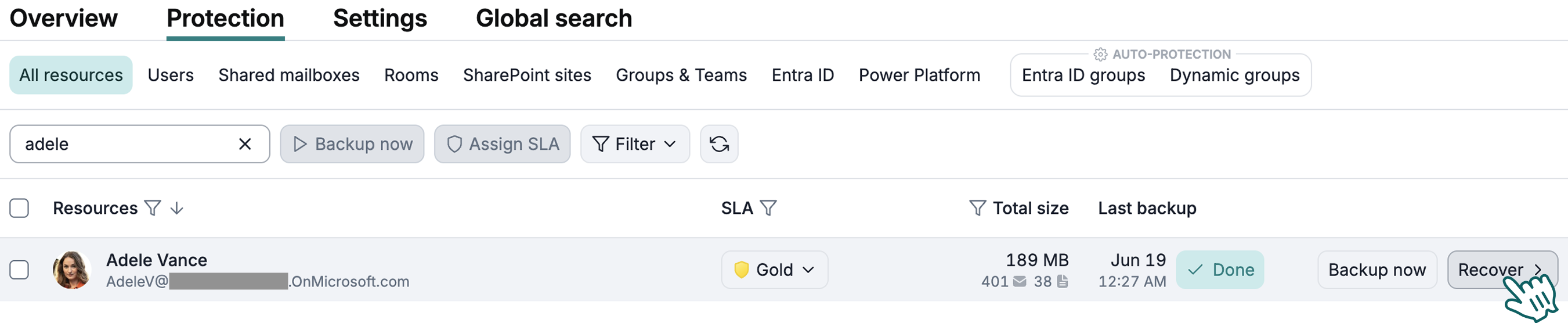
To delete an email or file from a backup, locate the corresponding resource on the Service → Protection tab and click Recover to open the backup browsing view.
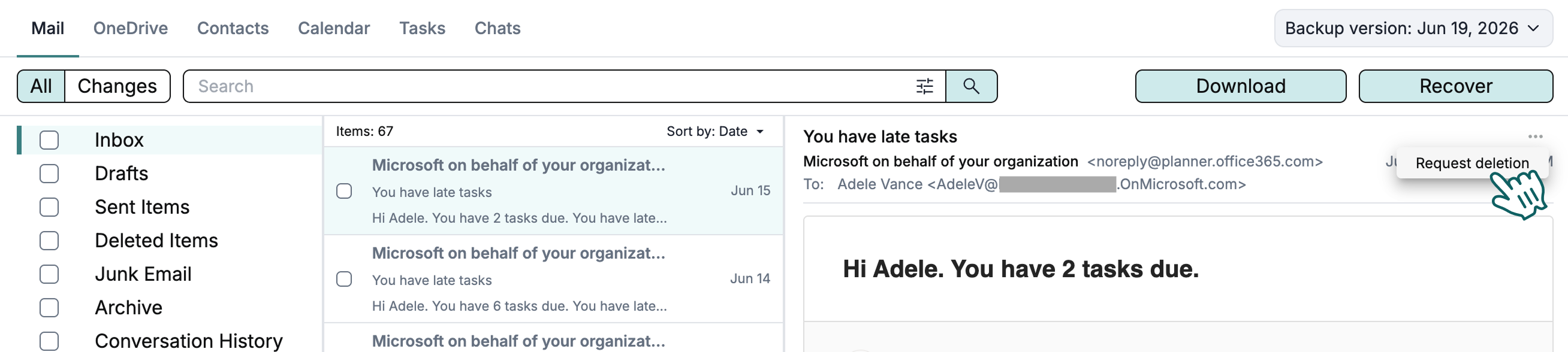
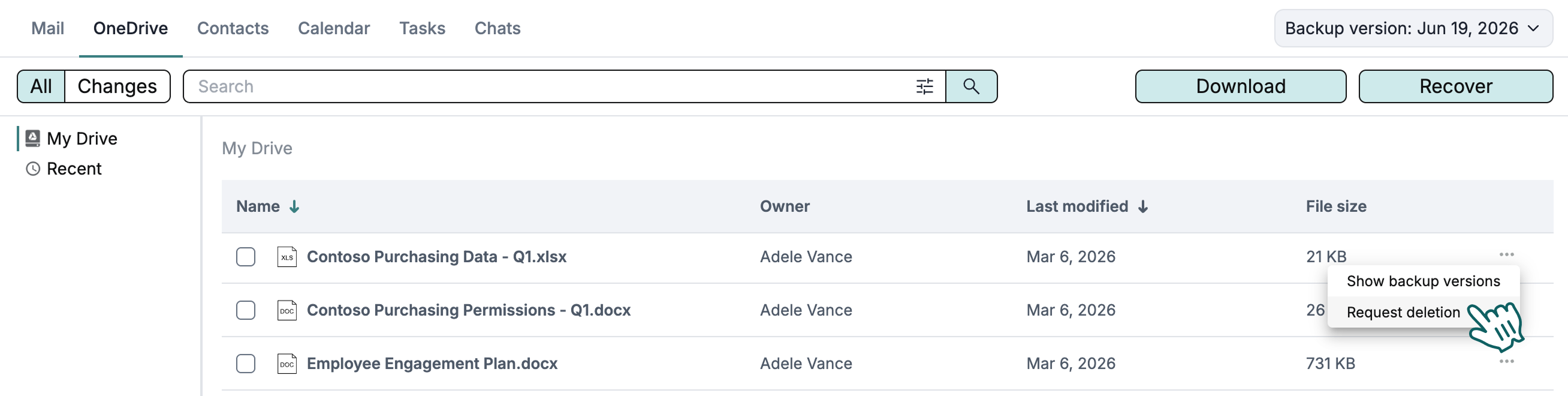
In the backup browsing view, locate the corresponding item, click the three-dot menu in the item tile, and then click Request deletion.
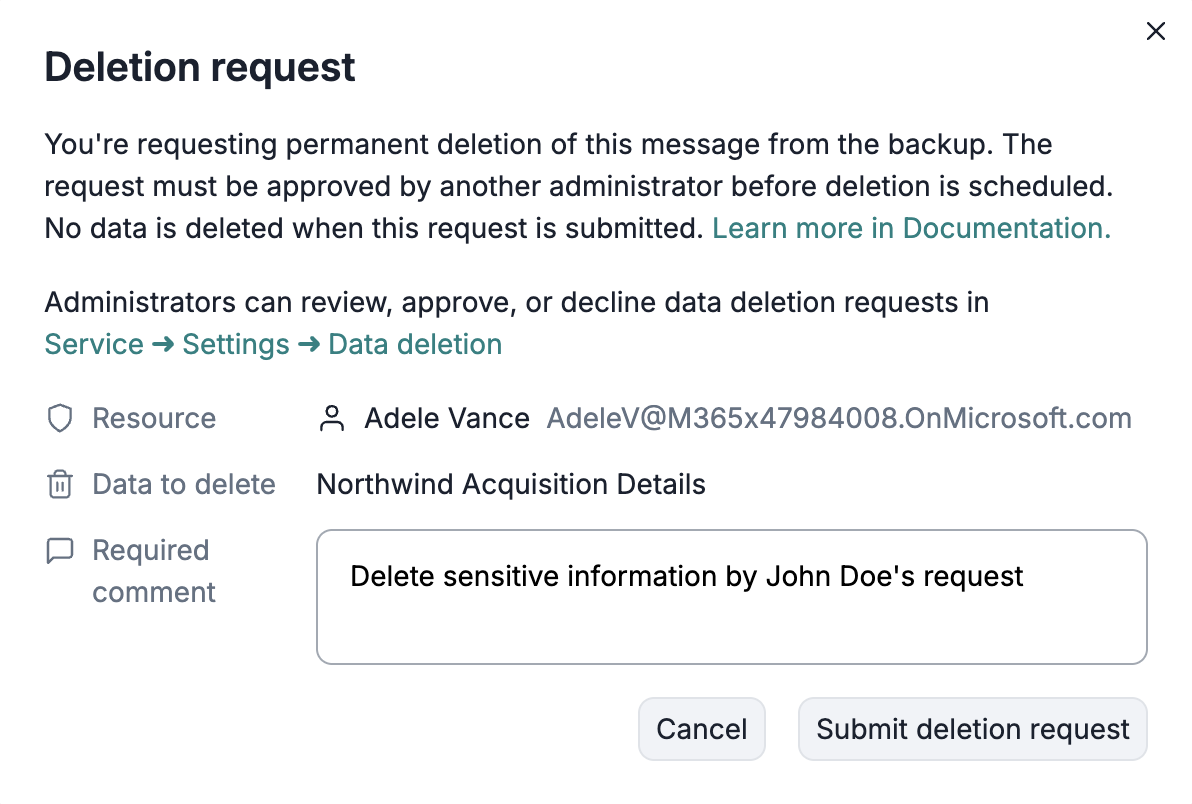
After you click Request deletion, Afi shows a dialog where you can enter a comment stating the reason for deletion for future review, and then click Submit deletion request. At this point, a data deletion request is created and must be approved by another Afi administrator on the Service → Settings → Data deletion tab.
Approving or declining data deletion requests
Afi administrators can review, approve, or decline data deletion requests on the Service → Settings → Data deletion tab.
Info
An Afi administrator cannot approve their own data deletion requests. If you are the only administrator in an Afi organization account, please add another Google Workspace or Microsoft 365 user as an administrator to review and approve your request.
For security reasons, we advise always configuring at least two Afi organization administrators so that your organization can still access the account if one of the administrators leaves the organization.
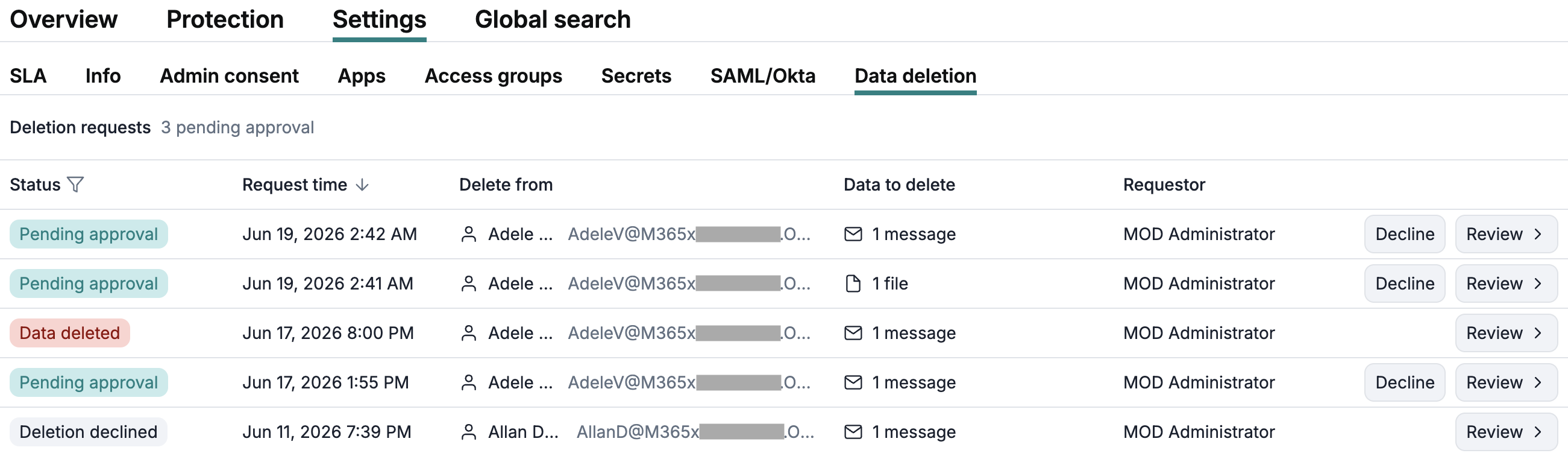
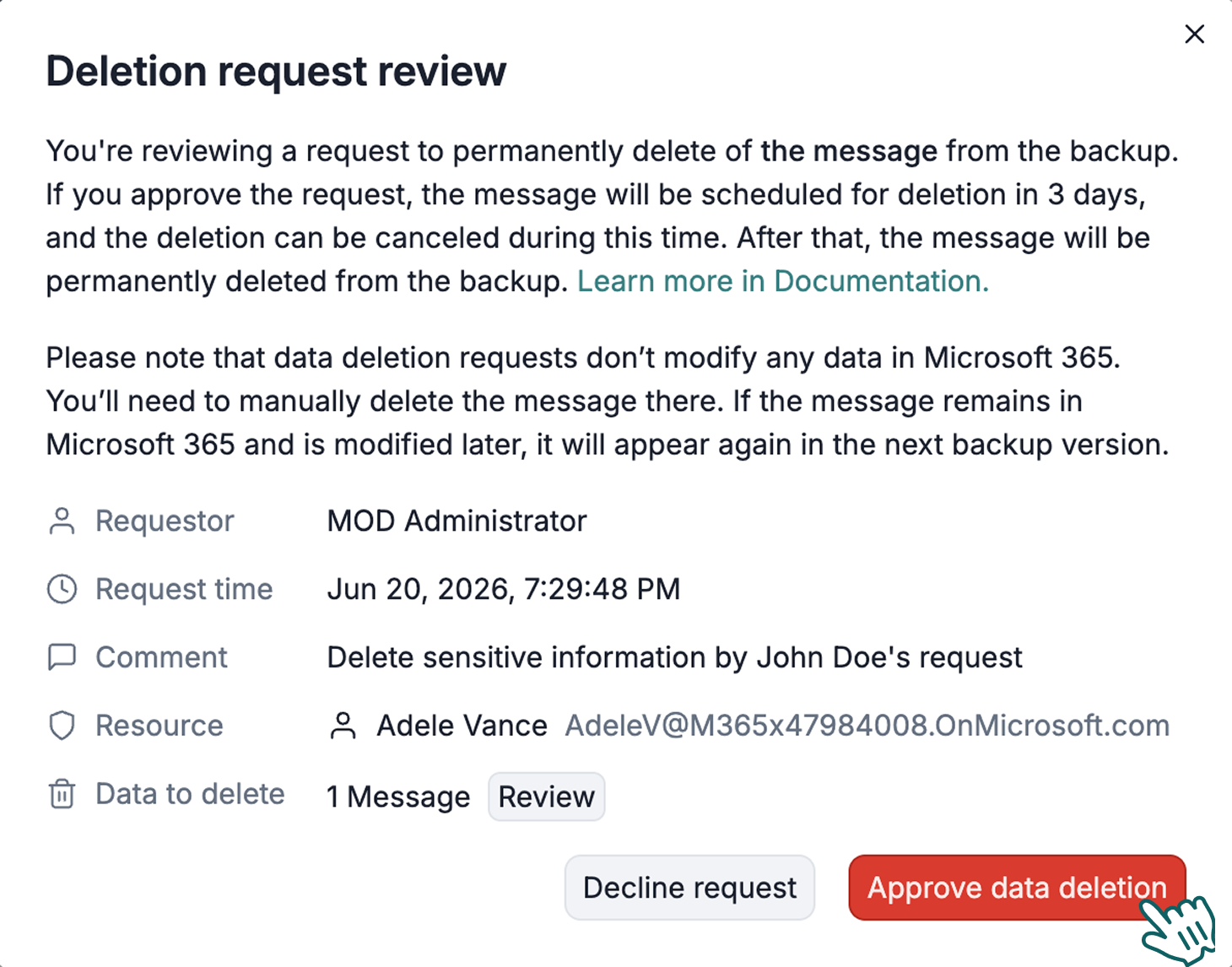
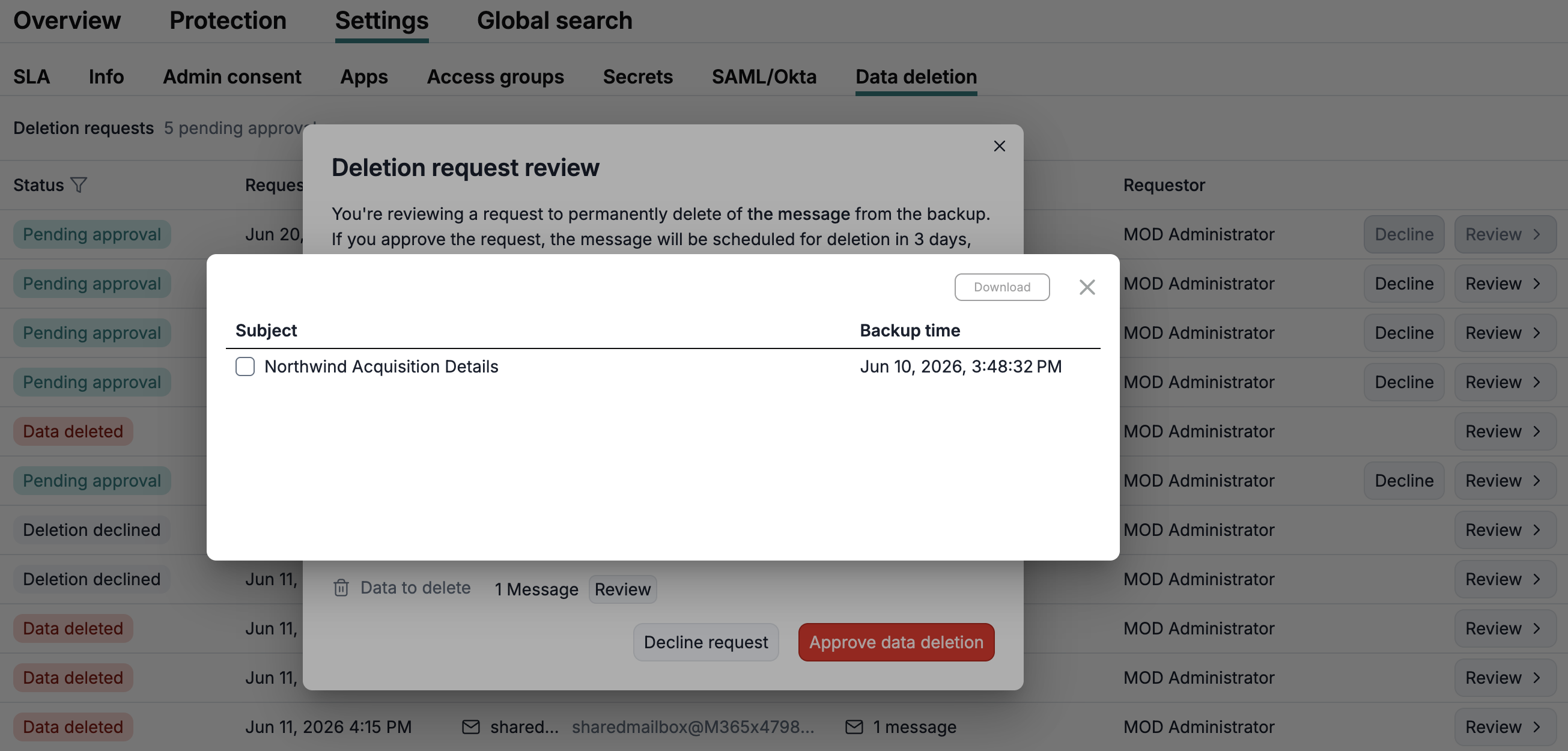
To review a data deletion request, click Review for the corresponding item. In the deletion request review dialog, you can see the requester information and the comment explaining why the data was requested for deletion. You can also click Review to view which items will be deleted, or download them for local review.
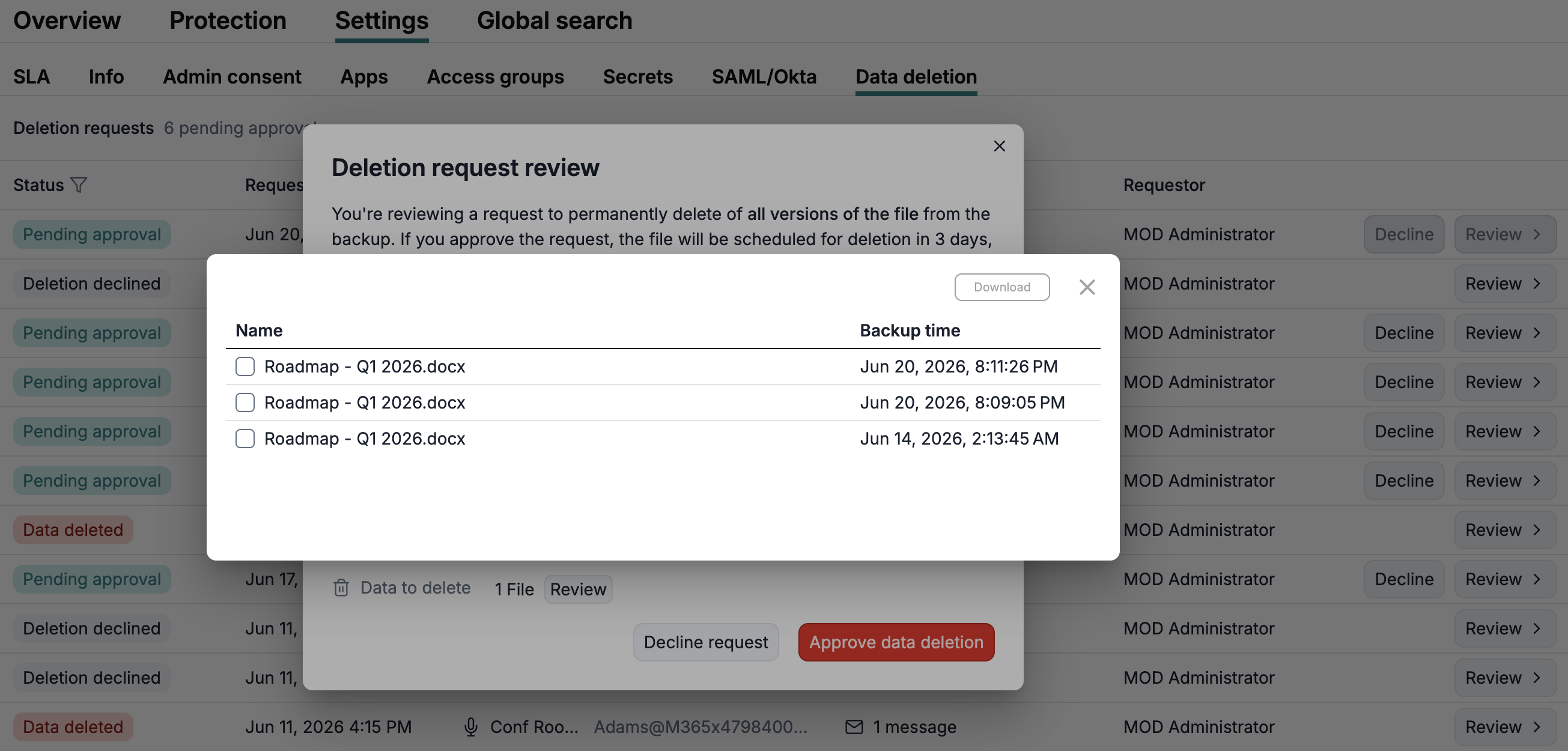
When a file is selected for deletion, you can review all of its versions as well. After approval, all versions will be deleted.
Once a data deletion request is approved, the selected data is scheduled for deletion after a 3-day grace period. During this period, the approved request can still be canceled.

Info
If a data deletion request isn't approved within 30 days, it expires automatically and can no longer be approved.
Once the grace period ends, the request can no longer be canceled and Afi runs an asynchronous deletion task to remove the requested data. After the request is successfully completed, its status in the data deletion requests table changes to Data deleted.
Info
Data deletion tasks are processed asynchronously so a request can start a few hours after the exact end of the approval grace period.
What is deleted
Data deletion requests affect only data stored in Afi backups. When a request is processed, Afi removes all backed-up versions of the items selected for deletion.
Afi does not delete or modify any source data in Google Workspace, Microsoft 365, or other protected systems so, before submitting a data deletion request, you should firstly remove the corresponding item from the source system. If an item deleted from Afi backups remains in the source system, it will be backed up again by Afi if it is modified or when Afi performs data resynchronization with the data provider.
Request statuses
| Status | Meaning |
|---|---|
| Pending approval | The request has been created and is waiting for approval. |
| Deletion in X days (Y hours) | An administrator has approved the request, but the deletion task hasn't started yet. The request can still be canceled during the 3-day grace period after the approval. |
| Deletion in progress | The deletion task has started and is removing the selected backup data. |
| Data deleted | The deletion task has completed. Deleted items are recorded in the task result. |
| Failed | The deletion task failed. |
| Deletion declined | The request was canceled before the deletion task started. |
| Expired | The request wasn't approved within 30 days and expired automatically. |
Audit events
Afi records audit events for the entire lifecycle of each data deletion request, including request creation, approval, completion, cancellation, expiration, and failure. Audit event details include the request ID, backup name, request comment, selected objects, and the deletion task result for completed or failed tasks.
For a full list of audit event types and their details, see the Audit article.