What's supported
Afi SaaS backup for Salesforce protects production organizations and sandboxes. Each organization or sandbox is a separate resource in Afi. You can assign it a backup SLA policy and browse, search, export, and recover its backups independently.
Salesforce resources
Afi supports the following Salesforce resource kinds:
- Production organization
- Sandbox
After a resource is added to Afi, administrators can protect it on Service → Protection. See the Salesforce onboarding guide for setup requirements.
SObjects and record data
Afi backs up records and accessible field values from queryable standard and custom SObjects exposed to the integration user through supported Salesforce APIs. This covers custom fields and custom objects, including namespaced objects from installed managed packages. The available objects and fields depend on the Salesforce features enabled in your organization.
Supported SObjects include, but are not limited to, Accounts, Contacts, Leads, Opportunities, Cases, Campaigns, Contracts, Orders, Assets, Tasks, and Events. Other examples include eligible Knowledge articles and article versions, data category assignments, Chatter feeds, tags, sharing records, field history, and records of queryable setup objects. See the Salesforce Object Reference for object definitions.
Information
Afi can protect only the records and field values that Salesforce returns to the integration user. Objects from installed managed packages follow the same rules as other custom objects: they must be queryable through Salesforce APIs and must not be among the unsupported object types listed below.
Data stored only in external services used by these packages is outside the Salesforce backup scope.
Field values and relationships
Afi captures accessible standard and custom field values, including text and rich text, numbers and currencies, dates and times, checkboxes, picklists, addresses, geolocation, and references to related records. It also captures the values returned by Salesforce for formula, roll-up summary, and other calculated fields, making them available for browsing and export.
The Salesforce integration user connected to Afi must have the View Encrypted Data permission to back up unmasked values from encrypted custom fields that use Classic Encryption. The integration user also needs the View Concealed Field Data permission to read user information concealed by Enhanced Personal Information Management. Without the relevant permission, Salesforce can return masked or concealed values. See Salesforce permission requirements.
During recovery, Afi restores values to fields that are writable by the integration user in the destination organization. Salesforce recalculates formula, roll-up summary, and other calculated values.
Afi also uses backed-up relationship information to restore supported links between records.
Salesforce Files and attachments
Afi backs up the contents of Salesforce Files and legacy attachments, so files remain available in retained backups even after they are deleted from Salesforce.
The initial backup can include multiple file versions already available in Salesforce. Subsequent backups capture newly added versions.
File backups include ContentDocument, ContentVersion, and ContentDocumentLink, which links files to the records and libraries they're shared with.
The Salesforce integration user connected to Afi must have the Query All Files permission and be able to read the file contents. This permission makes files visible even in unlisted groups and libraries the user does not belong to.
Files Connect content stored in external services such as SharePoint, OneDrive, or Google Drive must be protected in the service that holds it.
Object and field metadata
Afi backs up supported object and field metadata alongside record data. Depending on what Salesforce exposes for each object, this includes:
- Object and field descriptions, labels, data types, picklist values, and lookup and master-detail relationships;
- Custom object and custom field definitions, including default values, formulas, required and unique settings, and supported field history tracking and sharing settings;
- Record types and business processes, field sets, compact layouts, and available page layout descriptions;
- Validation rules, list views, search layouts, supported action overrides, and custom buttons and links.
Afi uses this metadata to display backed-up records and recreate supported custom objects that are missing from the recovery destination. The metadata is also available for export as XML.
Browse and search
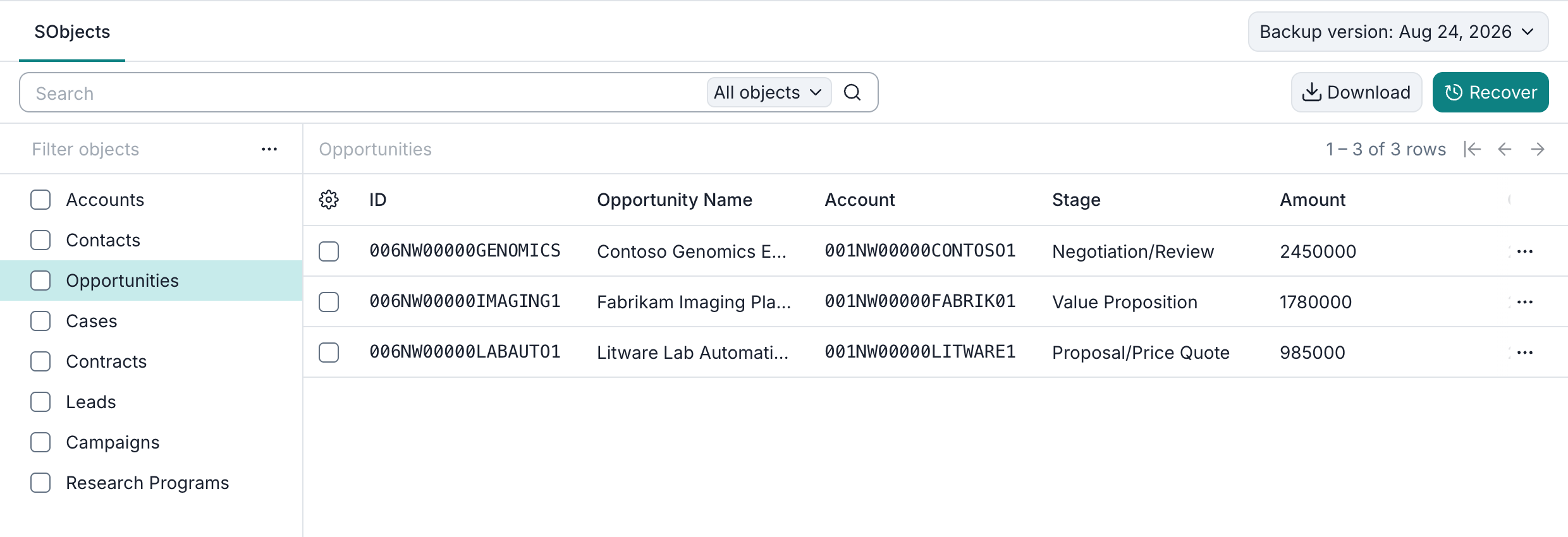
You can browse backed-up standard and custom objects on the SObjects tab. Select a backup snapshot to browse its records and open individual records to view their details. You can optionally choose which backed-up fields appear as table columns.
You can search the indexed record fields in each resource's backup. By default, Limit to current backup version restricts results to the selected snapshot. Turn it off to search record versions across all retained snapshots for that resource.
See Browse and Search for details.
Export
Afi supports the following export formats:
- CSV for SObject record data;
- JSON for SObject record data, in JSON Lines (
.jsonl) format with one record per line; - XML for available backed-up object metadata.
Exports of record data include the contents of supported binary fields. See Export for selection and format details.
Recovery
From a selected backup snapshot, you can recover:
- The full Salesforce resource;
- All backed-up records of one or more selected SObject types, such as all Accounts or all Contacts;
- Selected individual records, including records selected from search results.
Read-only SObjects can be browsed, searched, and exported, but cannot be selected for recovery.
If a supported custom object is missing from the destination, Afi can recreate it from its backed-up metadata before restoring its records.
You can recover records with or without their backed-up child records. To include supported child records, linked files, and attachments, select All under Child records.
Afi preserves supported relationships by recovering required records in dependency order and updating lookup and master-detail references to the corresponding record IDs in the destination.
You can recover data to the original Salesforce resource or another connected resource.
To use Recover to another tenant, cross-tenant recovery must be enabled for your Afi organization, and you must have the required permissions. The destination tenant must be onboarded in the same Afi organization and Afi region.
See Recovery for recovery options and behavior.
Coverage boundaries
Afi Salesforce backups currently do not include:
- Objects that are not queryable through the supported Salesforce APIs or can be queried only with a filter;
- Big objects, including field history archived by Field Audit Trail in FieldHistoryArchive;
- Event streams, such as platform events and Change Data Capture events;
- External objects;
- Data 360 (formerly Data Cloud) objects;
- Historical trend reporting data;
- Records already in the Salesforce Recycle Bin and archived activities.
Records captured before deletion or archiving remain available in retained Afi snapshots. A record created and deleted between consecutive backups may never be captured.